GPS Maps Live Navigation
- 3.9
- Rating
- 1.00M
- Installs
- Free
- Price

 Analysis by App-foxy
I approached GPS Maps Live Navigation as a practical travel tool rather than a feature checklist. It is a free Maps & Navigation app from TarrySoft that brings route planning, traffic information, and spoken guidance into one place. The basic promise is easy to understand: enter a destination, choose a route, and let the phone guide you. The more useful question is whether it can become dependable enough for everyday driving, short trips, and unfamiliar roads.
My overall impression is that it works best when I treat it as a simple navigation companion and prepare it before moving. The app has a 3.9 average from around 2.2 thousand ratings, and its reach is substantial, with over a million installs. Those figures suggest a product that many people find useful, but they also fit my experience: it is approachable and convenient, while not always the first choice for drivers who need the deepest traffic intelligence or the most polished ecosystem.
How I use it from destination to arrival
The most reliable workflow starts before I pull away. I open the app, search for the destination, check that the selected result is the right street or place, and look over the proposed route instead of immediately following the first instruction. That small pause matters. A navigation app can guide me correctly while still choosing a road that is inconvenient for the particular trip, especially when I know about local restrictions, difficult turns, or a preferred approach.
You May Also Like

 Blood Strike: 2.5 Anniversary
Blood Strike’s Loadouts Turn Every Drop Into a Tactical Gamble
A close look at Blood Strike’s custom loadouts: how fast access to signature weapons reshapes its battle royale rhythm, rewards preparation, and narrows the gap between fights.

 Pandora - Music & Podcasts
Pandora’s Music Is Easy to Start, but Harder to Recover
Pandora’s strength is its low-effort path from a seed to a station. Its weak spot is how much confidence it asks you to place in connection, setup, and quiet recovery.

 8 Ball Pool
 Is Built on Rivalries, Rematches, and Routine
A close look at the rivalries, rematches, shared routines, and unanswered safety questions that turn a quick pool match into a persistent mobile community.

 Samsung Music
’s Quiet Strength Is Playing What You Already Own
Its reach comes less from spectacle than from dependable access to a personal library. That simplicity is both the app’s strongest retention engine and its ceiling.

 AccuWeather: Weather Radar
AccuWeather Review: A Quick, Clear Forecast for Everyday Decisions
For everyday plans, the best forecast is the one you can understand quickly. AccuWeather makes rain timing, radar, and local conditions easy to act on, with a few trade-offs.

 Hill Climb Racing
Why Hill Climb Racing Still Turns Crashes Into One More Run
A tiny car, a bumpy hill and one more upgrade: Hill Climb Racing keeps resurfacing because its simple chaos makes every near-miss feel personal.
More From Our News Desk



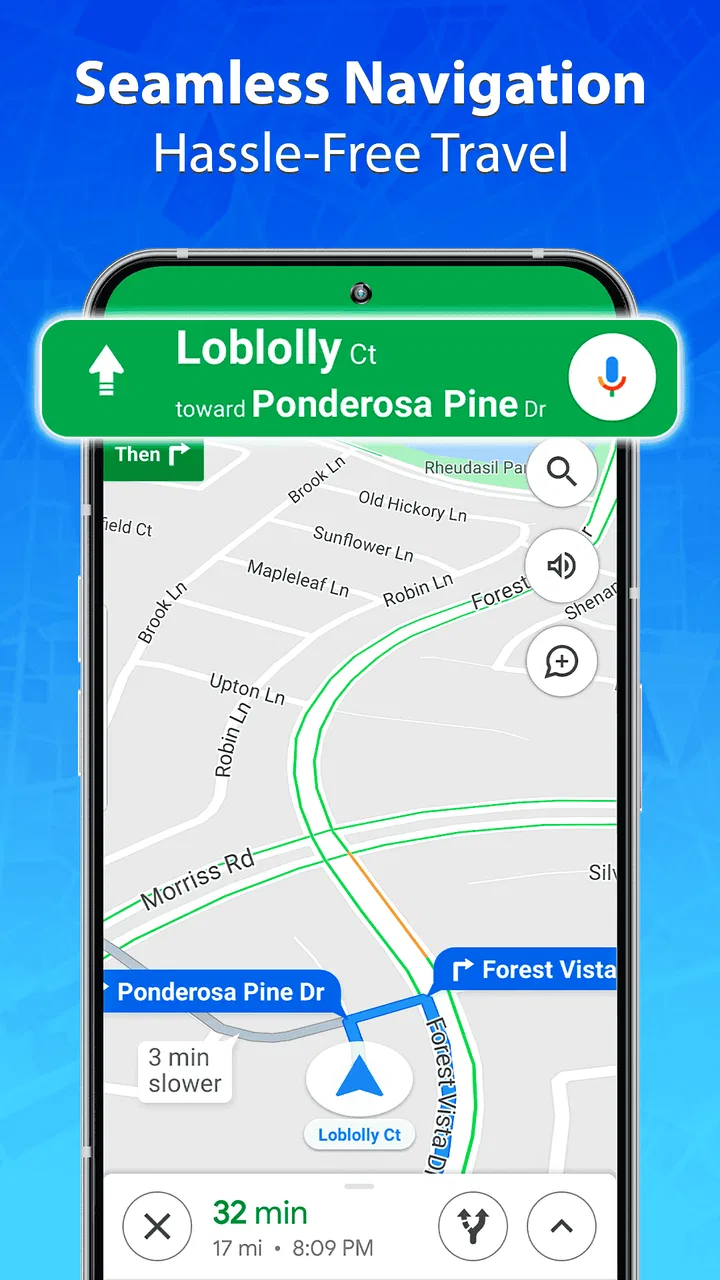
Once the route looks sensible, voice directions let me keep my attention on the road rather than repeatedly checking the screen. I find spoken guidance most useful on ordinary journeys where I already know the general area but want help with the final turns. It reduces the temptation to handle the phone while driving, although I still set everything up while parked and keep the device mounted where it is easy to glance at safely.
The route finder is also useful for trips that are not fully unfamiliar. I often use navigation to estimate the shape of a journey, identify the roads involved, and decide whether a destination is easier to reach from one side of a neighborhood than another. That is a better use than blindly obeying every instruction. The app supplies guidance, but local knowledge and common sense should remain in charge.
Live traffic can change the value of a route during busy periods. When congestion appears, the important habit is to compare the suggested alternative with the road I would normally take. A shorter displayed route is not automatically better: a narrow local street, a complicated series of turns, or a route that rejoins traffic later may create more stress than it saves. I prefer to use the traffic view as a decision aid, not as an unquestionable command.
For a realistic everyday example, imagine leaving work for a supermarket in an unfamiliar part of town. I would search for the store, confirm the exact location, inspect the final approach, and start voice guidance before leaving the parking space. If traffic builds on the main road, I would listen to the alternative but quickly check whether it sends me through residential streets. On arrival, I would stop navigation rather than leave it running and draining attention or battery while I shop.
This routine answers one practical concern: does the app suit occasional users? Yes, particularly if the goal is straightforward point-to-point guidance without learning a complicated system. It is less convincing for someone who expects navigation to manage every detail automatically, from highly specialized route preferences to a complete travel-planning ecosystem.
Settings I would check before trusting a route
I would begin with the phone’s location setting and the app’s access to it, because navigation quality depends on the device being able to determine where I am. I would also check sound volume and voice guidance before starting a trip. A route can be perfectly planned yet feel broken if instructions are too quiet, routed through the wrong audio output, or competing with music and calls.
The next check is the map display. I prefer a view that makes the current road and upcoming turn easy to recognize at a glance. Excessive visual clutter can make a screen look informative while slowing down decisions. If the app offers choices for map appearance or guidance presentation on the device, I would favor readability over decoration, especially at night or in bright sunlight.
Traffic information deserves its own check. It is useful only when I understand what it is changing in my journey. I look at the route before departure, then consider whether a reported delay justifies a detour. If I am already close to the destination, switching routes may create more confusion than continuing. If I am at the beginning of a long drive, the same traffic warning could be a good reason to reconsider.
I would also review the app’s purchase prompts before relying on it for regular use. The app is free to install, but in-app purchases range from $0.99 to $99.99 per item. That does not make the basic experience unusable, but it means I would pay attention to what is optional and avoid assuming that every visible feature belongs to the no-cost experience. Anyone sharing a phone with a child should be especially careful with purchase controls.
Compatibility is fairly broad for older devices because the app works from Android 6.0 onward. That can be helpful when a newer phone is not available, but an older handset may still have practical limits such as a slower processor, weaker battery, or less comfortable screen. The minimum operating system is not a promise that every device will feel equally smooth. For navigation, I would test it at home before depending on it during a long trip.
The app is rated for Everyone, which makes its presentation accessible to a broad audience. That age rating should not be confused with driving safety, however. I would never search while moving, hold the phone in my hand, or treat spoken directions as a substitute for watching the road. The safest setup is still a secure mount, a planned destination, and minimal interaction once the car is moving.
Repeatable habits that make it faster
Experienced use is less about tapping quickly and more about removing decisions at the right time. I search while stationary, select the destination carefully, and start guidance only after checking the first part of the route. This avoids the common mistake of beginning navigation with the wrong business branch, a similarly named street, or a pin that sits near the destination but not at its practical entrance.
I also separate route planning from route following. Before leaving, I use the map to understand the broad direction and likely turning points. During the trip, I rely mostly on voice prompts and occasional glances. This two-stage habit makes the app feel calmer because I am not trying to interpret the entire journey while already driving.
For repeated journeys, I keep a personal mental note of where the app may be less convenient than local knowledge. Perhaps the destination is easier to approach from a rear entrance, or a familiar road is more comfortable than a small shortcut. I do not need to reject the app; I simply use it for the unfamiliar portion and take over when I reach a part of town I know well.
Another useful pattern is to plan a little earlier when traffic matters. If I wait until the exact departure moment, I am more likely to accept the first route without thinking. A quick check before putting on shoes or leaving a meeting gives me time to compare the main route with the traffic picture. This is a habit rather than a special feature, but it improves the practical value of live navigation.
Voice guidance is strongest when I set expectations correctly. I listen for the next meaningful action instead of trying to memorize every instruction. At complex intersections, I slow down and verify road signs rather than turning solely because the voice spoke. If I miss a turn, I let the app recalculate instead of making an abrupt maneuver. That approach protects the usefulness of the tool without giving it more authority than it deserves.
I would not use the app as my only preparation for a place where connectivity, road access, or local rules are major concerns. For those journeys, I would note the destination address, identify a backup route, and make sure I can recognize the final approach. GPS guidance is excellent at reducing uncertainty, but it cannot remove every real-world problem around parking, private roads, temporary closures, or confusing entrances.
Where it fits beside familiar alternatives
Compared with a built-in phone map, this app offers a focused navigation experience centered on route finding, live traffic, and voice directions. That can be appealing if I want a separate tool rather than the default option already tied to my phone. The trade-off is that the default map may feel more natural for people who already keep their addresses, searches, and daily routines inside one larger platform.
Compared with dedicated navigation products, GPS Maps Live Navigation is easier to approach because its purpose is immediately clear. I do not need to spend much time learning a complex interface before trying a normal trip. On the other hand, a specialist alternative may be better for drivers who need more control over route types, frequent commuting decisions, or detailed planning across several stops.
Traffic information should also be judged by the journey rather than by the label. For a short city drive, a clear route and timely voice prompt may be enough. For a long commute where a few minutes regularly determine whether I arrive on time, I would compare its suggestions with another trusted source before changing my routine. The app is a sensible starting point, but I would not assume that every alternative route is equally practical.
The developer, TarrySoft, has kept the product positioned as a general-purpose app rather than a specialist tool for one profession or travel style. That makes it suitable for ordinary drivers, visitors, and people who want occasional help getting across town. It is less suited to users who want navigation to be deeply integrated with a broader collection of travel, transport, or vehicle-management services.
Limits that matter for advanced users
The biggest limitation is not that the app lacks a basic purpose; it is that basic navigation may not cover every edge case. If I need detailed control over avoiding particular road types, carefully coordinated multi-stop planning, or highly specialized travel modes, I would investigate another option before committing to it. A clean route finder is valuable, but advanced planning often demands more than a direct destination search.
Live traffic can be helpful without being infallible. Conditions change quickly, and a displayed slowdown may not explain whether the cause is a brief queue, a difficult junction, or a wider problem ahead. I treat the traffic layer as current guidance, not a guarantee. On an important appointment, I leave extra time rather than trying to recover every minute through increasingly aggressive detours.
Battery and attention are practical constraints too. Continuous location use, a bright screen, and voice output can be demanding on an older phone. I would begin with a charged device and use a car charger for longer journeys. I would also avoid repeatedly switching between apps to compare routes while driving. The safest advantage of navigation disappears if the process encourages constant screen interaction.
There is also a learning curve in discovering what the app is comfortable doing. A new user may assume that every visible map element represents a fully explained recommendation. I get better results by checking the destination, previewing the opening section, and accepting that the app may need human correction. That is not a flaw unique to this product, but it is an important boundary for anyone expecting complete automation.
Version 1.4.2 is the current version, and the app was released on September 4, 2022. I mention that because software age can affect expectations: I would keep the app updated through the normal store process and test it after an update before a major trip. A navigation tool should not be judged only by how it behaves in a quick trial at home; the real test is whether the workflow remains comfortable when I am rushed, unfamiliar with the area, or dealing with changing traffic.
Who should skip it? I would look elsewhere if my priority is a highly configurable navigation system, extensive trip organization, or a single platform that manages every travel detail. I would also be cautious if I dislike checking optional purchases or if my phone is old enough that location and voice guidance already feel sluggish. In those cases, a simpler built-in option or a more specialized navigation app may be a better fit.
My verdict after building a routine around it
I see GPS Maps Live Navigation as a useful, approachable choice for everyday point-to-point driving. It covers the essentials I expect from a navigation app: route discovery, traffic awareness, and spoken directions. Its free entry point makes it easy to try, while the Everyone rating and support for Android 6.0 onward make it accessible to a wide range of phone owners.
My recommendation comes with a clear condition: use it as an assistant, not as an unquestionable driver. Confirm destinations, check the first part of the route, review traffic before leaving, and keep a backup plan for important journeys. Those habits make the experience more dependable than simply pressing start and hoping every instruction matches reality.
For casual drivers, visitors, and people who want a straightforward map with voice help, I think it is worth trying. Its 1.4.2 version gives users a current starting point, and the app’s popularity shows that it has found a sizeable audience. Still, the average rating of 3.9 suggests a product that is useful without being universally loved, which matches my balanced view.
The best reason to choose it is its uncomplicated daily workflow. I can open it, find a destination, inspect the route, and follow spoken directions without turning navigation into a project. The best reason to choose something else is the need for deeper control and more specialized planning. If your trips are ordinary and your expectations are realistic, this app can reduce the friction of getting somewhere new. If navigation is central to your work or involves complex travel decisions, I would compare it carefully with more advanced alternatives before making it my only tool.
FAQs for GPS Maps Live Navigation
01What is GPS Maps Live Navigation, and what can I use it for?
GPS Maps Live Navigation is a mobile navigation app designed to help you plan routes and receive turn-by-turn driving directions. It can be useful for everyday commuting, road trips, and exploring unfamiliar areas. Depending on the version and device, it may also provide features such as live traffic information, map search, estimated arrival times, route alternatives, and location sharing.
02Does GPS Maps Live Navigation require an internet connection to work?
An internet connection is generally recommended because navigation apps often need online access for live traffic updates, map data, search results, route recalculation, and current road information. Some versions may support downloading maps for offline use, but availability and functionality can vary by region and platform. Before traveling, check whether your destination maps can be saved offline.
03Is GPS Maps Live Navigation free to download and use?
The app may be available as a free download, but some features can depend on advertising, in-app purchases, subscriptions, or the specific version offered in your country. Premium options may include an ad-free experience, enhanced navigation tools, additional map features, or other conveniences. Review the app-store listing carefully to understand what is included before starting a trial or purchase.
04How accurate is the navigation and live traffic information?
GPS Maps Live Navigation can provide useful guidance, but its accuracy depends on your phone’s GPS signal, internet connection, map coverage, road conditions, and the quality of available traffic data. Directions should be treated as assistance rather than a replacement for road signs or safe judgment. Always verify unusual instructions, especially in construction zones, private roads, or areas with weak GPS reception.
05What permissions and personal data does GPS Maps Live Navigation use?
A navigation app typically requests access to your location so it can identify your position, calculate routes, and provide turn-by-turn guidance. It may also request internet access, notifications, and optional permissions for features such as contacts or location sharing. Before installing, read the current privacy policy and permission list, and disable permissions that are not necessary for the features you intend to use.
Pros
- Clear turn-by-turn directions with helpful voice guidance.
- Live traffic information can help avoid delays on busy routes.
- Offline maps support navigation where mobile coverage is limited.
- Frequent map updates improve road and place accuracy.
- Useful search tools make finding nearby services quick and easy.
Cons
- Some features may require a paid subscription or in-app purchase.
- Live traffic and route updates depend on an active internet connection.
- GPS use can noticeably reduce battery life during long trips.
- Map accuracy may vary in rural areas or recently changed roads.
- Background location access may raise privacy concerns for some users.

GPS Maps Live Navigation
Gallery